PORTFOLIOART & DESIGN

UI DESIGN / SELECTED PROJECT 03

Small goals.
Bigger picture.

Monthly Goal Tracker

A Figma prototype built around monthly progress and reflection.

Watch the walkthrough ↓
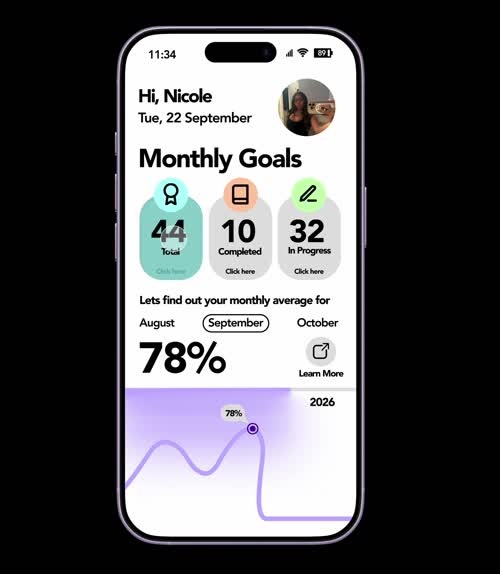
Monthly Goal Tracker home screen showing total, completed, and in-progress goals and a purple progress graph

FROM SYSTEM TO SCREEN

Progress that
means something.

I wanted goal setting to feel thoughtful and motivating.

The monthly view helps users step back from daily tasks and see what they are working toward. My first layout introduced goal totals and a progress graph; revisions gave that information a clearer structure.

I developed a Learn More screen to explain the graph, compare progress, and highlight goals that need attention. The prototype brings that reflection into the navigation.

DISCIPLINEInterface design & prototyping
TOOLFigma
FOUNDATIONSimple Design System

THE EXPERIENCE

A clear place
for every goal.

Screens captured from my prototype.
Select an image for a closer look ↗

A CONNECTED VISUAL SYSTEM

Consistent.
With personality.

Color-coded sections distinguish total, completed, and in-progress goals. Reusable cards and buttons connect the screens, with default, hover, and pressed states explored during development.

ALL GOALSCOMPLETEDIN PROGRESSINSIGHTS

THE PROTOTYPE IN ACTION

From overview
to insight.

A recorded walkthrough of the Figma prototype.
Use the player controls to pause or replay.

WATCH THE FLOW

Explore the
monthly picture.

The recording moves between the overview, goal lists, and progress insights.

Open the Figma prototype ↗

WHAT I LEARNED

Clarity is part
of the design.

This project helped me learn how a design system supports consistency and how interaction can give information meaning. I refined the layout and graph while developing my Figma skills.

Read my full process on Medium ↗

Explore more
of my work.

View Care Track ↗